How to Choose the Right Self-Storage Solutions
in 8 Steps

Share this post:

Introduction: How to Choose the Right Self-Storage Solution in 8 Steps

Most operators looking into self-storage solutions, or comparing a few options side by side, aren’t starting completely from scratch. They already use a facility management system that handles leases and takes payments, and on the surface, it seems to be working fine. But the real problems show up in different ways, like hours spent piecing together spreadsheets from different locations, rent increases that never happen because no one has time to check them one site at a time, and board meetings where the numbers just don’t line up across the whole portfolio.

That’s usually the real reason people start searching for self-storage solutions once their business gets big. It’s rarely because they have no software at all. It’s more often because the software they have was built to run one facility, and now they’re running dozens of them. The operator knows something isn’t working right. What they often don’t know yet is what to actually compare their current system to, or which features really separate a platform built for a whole portfolio from a tool made for a single site with a few extra reports added on.

This article is meant to work like a buying guide. It walks through eight things that matter most when you’re looking at self storage software solutions for a multi-facility business, in the order most operators end up discovering they matter. Segmentation comes first, followed by automation, revenue management, analytics, accounting, how open the system is, whether it’s ready for AI, and support. Each part explains what separates an older system that’s been stretched to cover a whole portfolio from a platform that was built for one from day one.

Key Takeaways:

  • Portfolio-grade self-storage solutions start with segmentation. Monument’s Navigator allows operators to create sets of facilities, and once a set is selected, the FMS operates around that set: reports, dashboards, analytics, automation, rate plans, promotions, ECRI, tenant communication, delinquency management, etc.
  • Automation lets the system take actions as if you were in there making every decision, taking pressure off your call center and ensuring that every action is perfectly timed and perfectly executed.
  • Revenue optimization is all the systems and tools that allow you to maximize every available rentable square foot (Economic Occupancy) through rental website optimization, lead conversions, rates plans, ECRI, promotions.
  • Your FMS must play nice with whatever vendor you chose (and not mandate a vendor) –  an open ecosystem for integrations ensures that you can connect your preferred tool anywhere in the process.
  • Actionable Insights. A system patched together to cover a portfolio hands back reports: raw data in a chart. A platform built for portfolio scale analyzes that data and hands back what to do next. Monument’s Insights module does this — 100+ actionable business graphs across operations, leasing, revenue management, and investor reporting.
  • You should be able to run your business on a cash basis while at the same time providing financials in an accrual basis to your lenders and investors.
  • Are you future-ready? Your FMS should let your own AI tools work directly with your data, not just talk to a chatbot bolted on top of it — look for an agentic AI roadmap that supports both read and read/write interaction with your data through AI agents, backed by an MCP server with a deep semantic layer, so you get real answers and the agents can complete complex tasks on your behalf. Monument’s agentic roadmap takes this all the way, pairing read-only Copilot agents with read/write Wedge, Sentinel, and Orchestrator agents — all four securely accessing, querying, and taking actions on your data through an MCP server.


Self-storage software built for
high-performance operators

Why Choosing the Right Self-Storage Solutions Gets Harder at Scale

A facility management system that works fine for three locations usually starts to break down somewhere between ten and thirty. The problems seem small at first, but they add up fast. Someone has to pull a report one facility at a time instead of all at once. Every regional manager handles late payments a little differently. A rent increase gets pushed to next quarter because nobody has time to think it through properly this month.

On their own, none of these problems are a big deal. An operator running three facilities can handle that extra work personally. But add them all up, and they get expensive fast. An operator running thirty facilities can’t keep up the same way, no matter how good the team is. Ten minutes of manual work per facility each week doesn’t sound like much, but multiply that across thirty facilities, and it turns into five hours a week.

That’s really what it comes down to when you’re picking the right self-storage solution. The best choice isn’t the one with the most features. It’s the one built around how you actually run your portfolio day to day.

Compare Automation Depth, Not Just Automation Claims

Nearly every self-storage software vendor claims automation somewhere in their marketing. But automation can cover everything from a single automated email template to a full rules engine that runs complex, multi-step workflows across an entire portfolio without human intervention. When you’re looking for a solution that can handle portfolio-level multi-facility management, carefully consider the automation depth that’s being offered.

First, let’s examine how Monument implements automation, then we will look at some use cases and differentiators to illustrate how this works in practice.

Automation runs on three building blocks: triggers, actions, and variables, and rules can apply to specific sets of facilities.

Triggers are what cause a rule to fire, like a lead getting created, an invoice going a day past due, a lease getting signed, or a payment failing. Monument’s trigger list is long, and you can time-adjust them (e.g., five days after an invoice is past due) and group them with ANDs and ORs (e.g., current rent 30%+ below web rates AND the facility is stabilized). Triggers also need to be smart enough to stop firing once the underlying condition changes. The system shouldn’t send a promotion to a lead who already became a tenant, or a delinquency notice to a tenant who just paid.

Actions are what happen once a trigger fires, like sending an email or SMS, invoicing a tenant, creating a task, marking an account as paid, and more. A single trigger can also set off several actions at once, like sending a late fee invoice, adjusting the amount due, and creating a task for the call center to follow up.

Variables pull in the details that make an action specific, like a tenant’s name, their rent amount, a link to their unfinished lease, or a link to the facility’s Google review page.

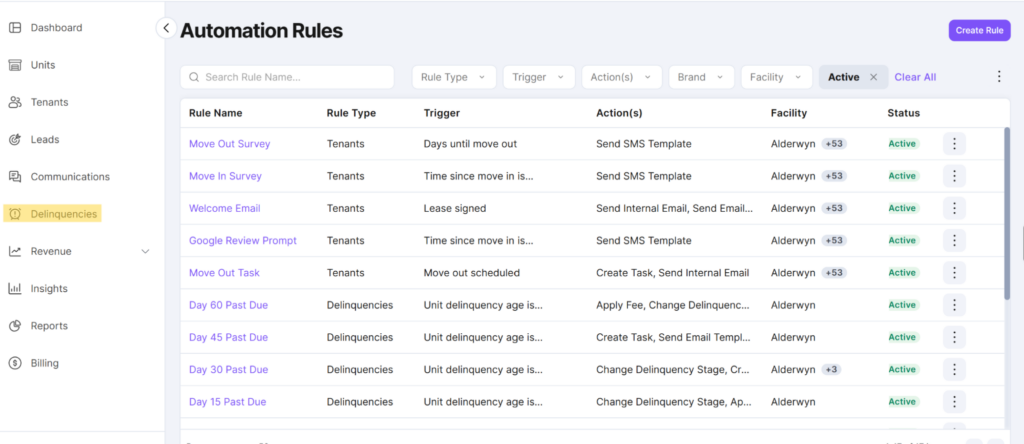
Rule-based automation runs across three core categories:

  1. Leads
  2. Tenants
  3. Delinquencies

A lead automation might trigger on lead age or an abandoned cart at checkout, sending a follow-up sequence without anyone deciding to send it each time. A tenant automation might trigger on days until move-out or a signed lease, generating the right communication or task automatically. A delinquency automation might trigger on invoice age, applying fees, sending notices, and escalating overlock actions based on rules the operator sets.

Automation rules can also tie to a specific set of facilities, using the same segmentation built through Navigator. An operator might build rules that only apply to lease-up facilities (special discounted rates), only to facilities with RV storage (a dedicated email explaining vehicle storage guidelines), or only to college town facilities (fall move-in promotions).

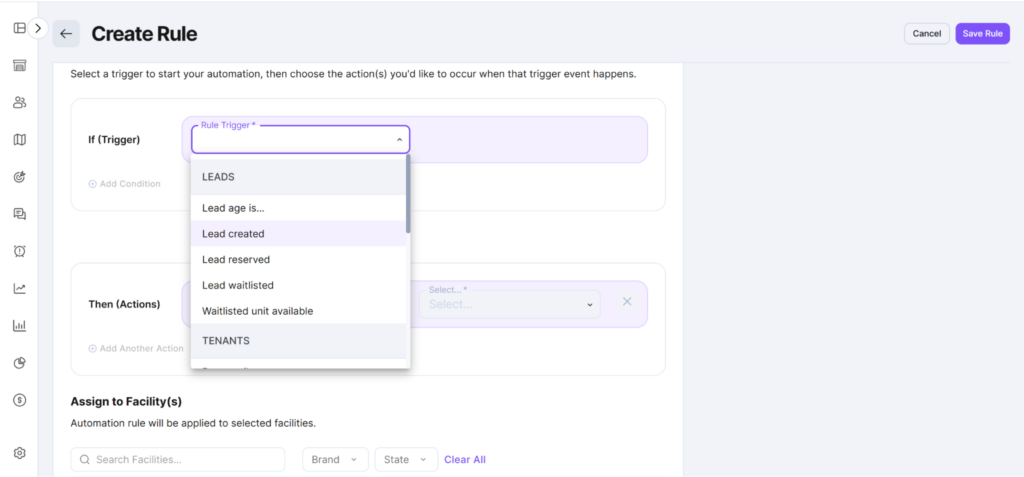
Here’s a visualization of what these examples would look like:

Lead Automations

With lead automation rules in Monument, you can instantly follow up with incoming leads rather than having to wait for someone to manually contact them.
In addition to lead automation rules, you can create custom rules based on tenants and delinquencies so that certain administrative actions are taken automatically.

The distinction that matters is between generic templates and detailed, operator-defined rules. A generic template sends the same email to every tenant regardless of context. A properly built rules engine lets an operator define exactly which trigger, condition, and action apply to exactly which facility set, with the flexibility to adjust as business needs change. This is a meaningfully deeper capability worth testing directly during any evaluation of self storage software solutions. Ask to see how a delinquency rule would be configured differently for a lease-up property versus a stabilized one, and how long that configuration would take. The best self storage software solutions make this simple enough for a non-technical operations team to manage on its own.

What Separates the Best Self-Storage Software Solutions From Basic Task Automation

Three things separate genuinely deep automation from a surface-level feature:

  1. Rules that apply across an entire facility set, not one site at a time. When a rule has to be manually recreated for every property, the platform isn’t offering portfolio-level automation. It’s offering facility-level automation that happens to exist in more than one place.
  2. Consistency enforced automatically, not dependent on staff follow-through. The value of automation isn’t speed. It’s that the rule runs the same way every time, regardless of who’s working that day, how busy the call center is, or whether a manager remembered the process correctly.
  3. Reduced manual workload without cutting headcount. This point deserves emphasis, because it’s where automation messaging often goes wrong. The goal of a well-built automation system isn’t to replace people. It’s to remove the repetitive, low-value work that consumes a skilled team’s time, so that the same team can focus on the judgment calls, tenant relationships, and strategic decisions automation can’t make. A platform that frames automation purely as a way to shrink a call center misunderstands what makes the technology valuable in the first place. It’s a force multiplier for good people, not a substitute for them.

Five Places Automation Actually Pays Off Across a Portfolio

  1. Delinquency management that doesn’t depend on a manager checking every account

    With a manual process, a regional manager reviewing 50 facilities across a dozen states has to track which tenants are on day 10 versus day 40, apply the right late fee, and remember which state’s lien rules apply before sending a notice, and missing a single step turns a late payment into a compliance problem. With automation, a missed payment triggers a workflow that checks the tenant’s full billing history, applies the correct fee for their unit type, and sends the right notice in the right sequence, automatically adjusted for that facility’s state-specific lien timing. The real benefit goes beyond time saved to consistent, defensible collections behavior across every facility regardless of which state it’s in, closing off the wrongful-sale lawsuit waiting to happen at the one facility nobody double-checked.

  2. Lead follow-up that doesn’t go cold while someone’s busy

    A single facility can get by on a manager checking leads a few times a day, but a portfolio generating hundreds of leads a week can’t, because follow-up speed is one of the biggest levers on conversion and nobody can watch every lead at once. Automated follow-up and abandoned-cart recovery sequences fire the moment a lead goes quiet or a prospect exits mid-checkout, without waiting on a person to notice. That means leads get followed up consistently at portfolio scale, rather than the operator finding out months later, when a conversion number quietly drops, how much revenue walked away.

  3. Billing automation that catches revenue leakage before it compounds

    A failed autopay charge that doesn’t retry correctly, or an invoice that doesn’t match the ledger, looks like a non-event on any single day, but multiplied across 50 to 100 facilities over a year, it becomes a real hit to NOI that’s nearly impossible to trace back once it’s buried in a quarter’s worth of transactions. Automated retry logic on a schedule the operator controls, automatic reconciliation with the general ledger, and real-time reporting on collected versus invoiced surface that gap immediately, rather than at month-end close when it’s much harder to fix.

  4. ECRI that responds to occupancy in real time instead of on a quarterly calendar

    Without automation, rent increases typically happen on a manual review cycle, often quarterly, so a facility that hits 95% occupancy in week two still won’t see a rate adjustment until the next scheduled review. Automating ECRI to trigger off real-time occupancy thresholds at each facility, rather than a flat schedule applied portfolio-wide, means pricing reflects actual demand as it happens. That captures revenue the moment it appears, instead of three months later during a review that’s already too late to act on.

  5. Move-in and welcome sequences that don’t depend on which facility handled the lease

    Printing, scanning, and filing a lease, then manually sending move-in instructions, access codes, and payment setup steps, produces an inconsistent tenant experience, where some tenants get a smooth welcome and others get whatever a busy manager had time for that day. Automating this, with e-signature built into the leasing flow and a welcome sequence triggered the moment a lease is signed, means every new tenant gets the same instructions, codes, and setup steps at the same point in their timeline, regardless of facility or how busy that location is. Across a portfolio doing hundreds of move-ins a month, that consistency is the difference between a brand experience and a coin flip.

Across all five of these, the main benefit is that the task gets done the same way, every time, at every facility, without depending on a specific person remembering to do it. That’s also the test you should keep in mind when evaluating any vendor’s automation claims. Ask whether a rule runs across the whole portfolio at once, or whether it’s just the same manual step, spread across more screens.

Evaluate Revenue Management

Revenue optimization and management is one of the widest gaps between legacy self-storage software and modern platforms, and it’s often the least understood by operators until they see what a properly built system can do.

What does Revenue Management mean? In a nutshell, revenue management  is about all the tools that help operators maximize their Economic Occupancy (max rent for every rentable square foot in the portfolio). It goes well beyond intelligent rates on the rental website and includes things like:

  • Rental website conversion optimization. A site built to convert turns visitors into signed leases instead of losing them at checkout. Simple things like clear unit availability and a fast, mobile-friendly signup flow make the difference between a browser and a tenant.
  • Rental website upsells and additional fees. Every lease is a chance to capture more than the base rent. Offering the right add-ons at the point of sale, like extra access hours or packing supplies, lifts the value of each new tenant without touching street rates.
  • Lead capturing and conversions. Not every prospect rents on the spot, and the operators who win are the ones who capture that interest anyway. A strong system logs every inquiry, whether it comes from a phone call, a web form, or a walk-in, so nothing falls through the cracks before it ever reaches automated follow-up.
  • Intelligent promotions that help convert every opportunity. Blanket discounts eat into margin without moving occupancy. Promotions that target the specific units or unit types sitting vacant the longest push occupancy where it actually counts, instead of discounting units that would have rented anyway.
  • Dynamic rate plans based on facility types and strategy. Not every facility should run on the same pricing logic. A climate-controlled unit in a competitive urban market needs a different strategy than a drive-up unit in a rural lease-up property, and operators need the flexibility to set that logic facility by facility.
  • Targeted and effective ECRIs. Getting ECRI right starts with setting the correct rules and thresholds for each portfolio segment before any automation runs. A rent increase strategy built for a stabilized suburban property won’t fit a newly acquired facility still in lease-up.
  • Insights analytics that helps you identify every opportunity and report on your progress. Numbers only help if operators can act on them fast. A revenue management platform should point straight to where money is being lost, whether that’s stale promotions, underpriced unit types, or rate plans that haven’t kept pace with demand, rather than just reporting what already happened.

Most legacy systems treat pricing as a static field. A rate gets set, someone checks competitors occasionally, and adjustments happen sporadically and manually, usually driven by gut feel rather than data.

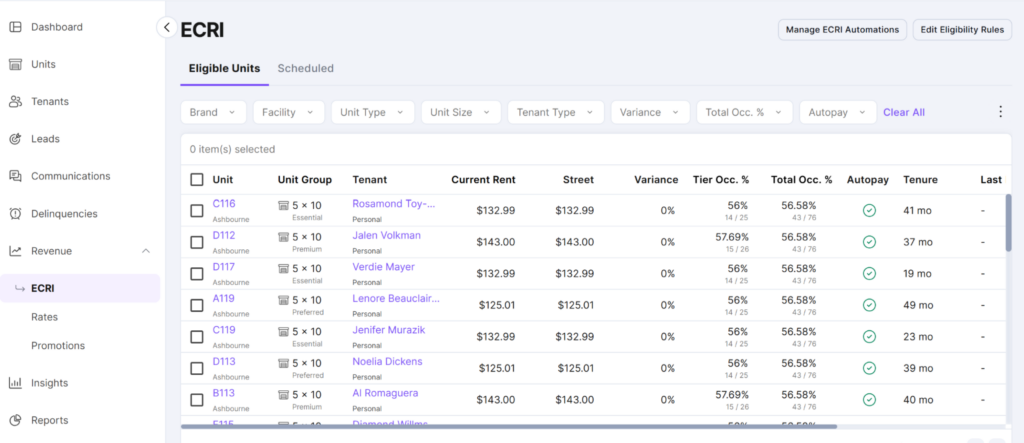
The standard worth evaluating against is dynamic pricing paired with an automated Existing Customer Rent Increase, or ECRI, workflow. Dynamic pricing means street rates adjust based on real-time demand signals, unit availability, and market conditions instead of sitting fixed until someone remembers to update them. ECRI automation means rent increases for existing tenants get recommended, sequenced, and tracked systematically, using tenant data and churn sensitivity modeling to identify who should receive an increase, how much, and when, rather than leaving that decision to inconsistent manual review.

An example of an ECRI workflow created in Monument.

At the end of the day, most operators aren’t leaving revenue on the table because of missing demand. They’re leaving it on the table with the tenants and leads they already have. New customer acquisition gets the most attention because it’s visible and exciting, but a portfolio with hundreds or thousands of existing tenants who haven’t received an appropriately timed rent increase, or leads who abandoned checkout without a follow-up sequence, represents a much larger and more immediately addressable revenue opportunity.

Revenue Per Available Foot (RevPAF)

RevPAF is a metric worth paying attention to rather than just raw physical occupancy. A facility can be 95 percent physically occupied and still badly underperform on RevPAF when its rates sit too low relative to demand, when too few tenants have opted into value-added services, or when delinquent balances are quietly eroding collected revenue. Physical occupancy answers whether units are full. RevPAF answers whether the portfolio is generating the revenue those units are capable of producing.

Optimizing RevPAF involves two distinct groups: new tenants and existing tenants.

  • New tenants

    A well-built revenue management platform should serve optimal pricing automatically through rate automation, tied to real demand and inventory signals rather than a rate card set months ago. It should support a Good-Better-Best structure for unit selection, letting prospects choose to pay slightly more for a unit near the elevator or with better access, which lifts average transaction value without changing base rates. It should optimize tenant protection coverage too, meaning both the take rate (the percentage of new leases that select the operator’s protection plan over outside insurance) and the tier prospects choose within that plan. And it should support additional services and fees, such as after-hours access, security monitoring, or commercial use add-ons, layered onto base rent rather than left as an afterthought at signing.

    Beyond pricing structure, the platform’s lead conversion tools matter directly to RevPAF, since every additional shopper converted into a signed tenant is incremental revenue the portfolio wouldn’t otherwise have captured. This connects new tenant pricing back to the lead automation discussed earlier. Abandoned cart capture, automated follow-up sequences, and a frictionless leasing flow all feed directly into the top of the revenue funnel.

  • Existing tenants

    ECRI is the other half of RevPAF optimization, and it requires answering four questions systematically rather than case by case. What to charge, who should receive an increase, who’s currently due for one based on their tenure and rate history, and how to minimize churn among tenants who receive an increase. Churn sensitivity modeling is the tool that makes this last question answerable with data rather than guesswork, identifying which tenants are likely to be retained after a rent increase and which carry meaningfully higher risk of vacating, so the operator can calibrate increases with that risk in mind rather than applying a flat percentage across the board.

Insights — Analytics That Go Beyond Basic Reporting

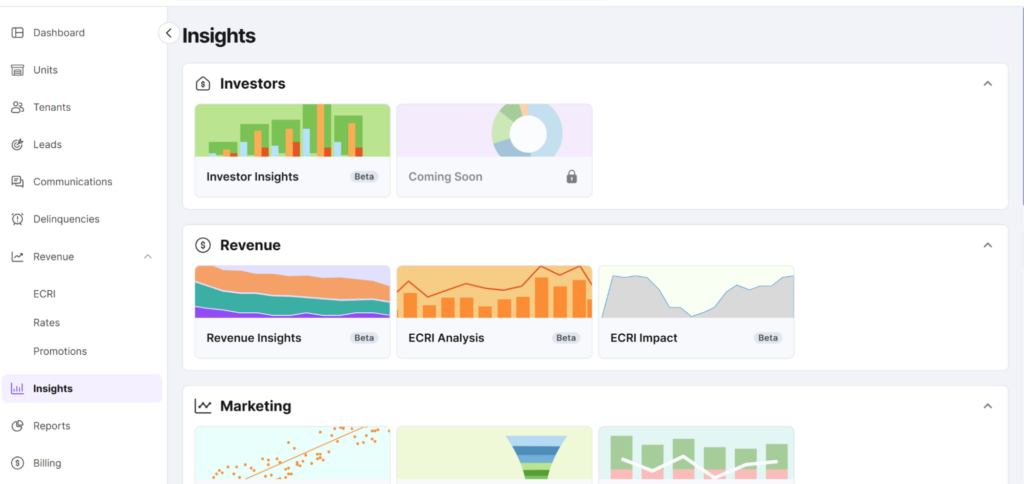
The bar for analytics at portfolio scale is real-time, portfolio-wide insight, not a static monthly export someone reviews after the numbers are already a month old. This distinction matters more than it might initially seem, because the value of data decreases the longer it takes to reach the person who can act on it. A report that surfaces a delinquency spike three weeks after it started is far less useful than a dashboard that surfaces the day it begins. This is the kind of information you can see on your Insights dashboard within Monument.

Insights are actionable information that interprets your raw data (reports) to help you understand your business and uncover opportunities

Monument’s Insights dashboard provides instant access to a variety of useful analytics, from revenue to marketing, and more.

The depth to expect from a genuinely capable analytics platform is measured in the number of purpose-built insights available, not just the presence of a reporting tab. Platforms designed for portfolio-scale operators typically offer well over 100 distinct, purpose-built insights spanning marketing, operations, revenue management, and investor reporting, correlating different data streams into actionable knowledge rather than presenting raw numbers in isolation. A handful of dashboard widgets showing occupancy and revenue isn’t the same category of tool.

Capability Basic Reporting Tools Deep Insight Platforms
Update frequency Monthly or on-demand exports Real-time, continuously updated
Segmentation Fixed, facility-by-facility view Custom, portfolio-wide facility sets
Trend detection Manual comparison across periods Automated correlation across data streams
Investor-readiness Requires manual compilation before use Presentation-ready reporting on demand

The practical test during evaluation is simple. Ask to see how quickly a specific question could get answered, such as which facility set has the highest tenant protection take rate this month, or which region’s delinquency aging has worsened over the last quarter. A basic reporting tool will require pulling and combining data manually, while a deep insight platform will surface the answer directly, often with the underlying trend already visualized.

Monument’s Insights are organized in multiple collections of graphs (dashboards) around the following themes:

  • Revenue – Revenue Insights, ECRI Analysis, ECRI Impact
  • Marketing – Marketing Insights, Rental Website
  • Operations – Operational Insights, Leads
  • Facilities – Facility Insights
  • Third Party Management Insights
  • Investor Insights

Insights can be consumed two ways. Operators can view them as graphs and dashboards inside Monument, or they can pull them straight into an AI assistant through the MCP Server. That second option means the same data can answer questions on demand, not just sit in a report waiting to be checked. We’ll get into more about this in the “How Monument’s MCP Server Works” section below.

True Accrual Financials

Cash-basis accounting alone tends to be a dealbreaker for operators working with sophisticated investors, lenders, or institutional ownership. The two accounting models tell very different stories about the same business:

  1. Cash-basis accounting records revenue when money changes hands. It’s simple and very helpful for managing cashflow, but it doesn’t reflect the true financial position of the business at any given point in time.
  2. Accrual accounting records revenue and expenses when they’re earned or incurred, regardless of when cash actually moves, producing financials that meet Generally Accepted Accounting Principles, or GAAP. When talking to banks or private investors, accrual-based accounting is what they will usually ask for.

Legacy FMS typically produced only cash-basis accounting, which is sufficient for many operators. Historically, when asked to produce accrual-based accounting, operators had to export their numbers into Excel and do some serious spreadsheet gymnastics, a process that’s time-consuming and introduces meaningful risk of error, particularly across a large portfolio with many facilities and revenue streams.

True accrual accounting in Monument is offered alongside cash accounting, with audit-ready output built in rather than reconstructed manually.

The payoff shows up at the moments that matter most:

  • An operator preparing for a capital event, whether a refinance, a sale, or a new investor coming into the portfolio, needs financials that pass due diligence without weeks of scrambling to reconstruct accrual figures from cash records.
  • An operator reporting quarterly to existing investors needs numbers that satisfy stakeholders on the first pass, not after several rounds of clarifying questions about how figures were calculated.

Self storage software solutions that produce true accrual accounting natively, with automated daily journal entries and clean integration into the general ledger, turn what would otherwise be a stressful scramble into a routine reporting cycle.

Integrations (Open vs. Closed Ecosystem)

The core tradeoff here is straightforward. Closed platforms lock an operator into using that vendor’s own rental website, access control system, tenant protection solution, revenue management vendor, call center voice integration, etc, whether or not those tools are actually the best fit for the business. Open platforms don’t. They let the operator choose the best available tool in each category and connect it to the core system, rather than forcing every piece of the tech stack to come from a single vendor’s catalog.

This matters because no single vendor builds the best rental website, the best gate hardware, the best pricing optimization engine, and the best tenant protection program all at once. A genuinely open, API-first platform recognizes this and focuses on being the central hub that connects an operator’s preferred tools, rather than trying to be the only tool for everything. The standard worth evaluating against is whether the platform connects to the vendors an operator already trusts and already has relationships with, not just the vendors the software company happens to sell or partner with.

Monument is an open ecosystem that integrates with any tool that you want to use. The platform’s open architecture also means new integrations can be added as operators need them. That flexibility keeps your tech stack adaptable as your portfolio grows, rather than locking you into pre-determined solutions.

AI Readiness

Every step change in software delivery has followed the same pattern: the gain was never really about the new technology; it was about what an operator no longer had to do. Moving off on-premise servers and per-facility installs didn’t just cut hardware costs — it meant a regional director stopped needing to be at (or connect into) each facility’s own machine to see what was happening there, and started getting one login, real-time numbers across every location, and an update that shipped to everyone overnight instead of a disc that shipped to nobody. Agentic AI is the same kind of gain, one layer up: the software stops waiting for someone to notice a problem on a screen and starts flagging or acting on it directly. An FMS that doesn’t build for this isn’t missing a feature — it’s asking its operators to keep doing, by hand, the exact kind of noticing and catching-up work the cloud transition was supposed to have already eliminated.

The cost of skipping this isn’t theoretical, and it’s already showing up in the data from the closest comparable vertical. A 2026 AppFolio benchmark survey of over 1,600 residential property management professionals found that firms who’ve broadly adopted AI are projecting an average 31% portfolio growth in 2026 — nearly triple the 12% growth expected by firms that haven’t — while elevated vacancy squeezing NOI was the single most-cited threat, named by 55% of respondents, which is the exact NOI pressure self-storage operators already track obsessively. That tracks with what analysts are seeing across real estate more broadly: companies that fail to adopt AI risk falling behind competitively, and the gap between early adopters and everyone else is widening rather than narrowing. The mechanism is structural, not hype: operators who build the data and AI capabilities now accumulate an advantage that’s genuinely difficult for a late mover to close a few years out. That’s the real thing an operator misses out on with an FMS that hasn’t invested here — not a missing chatbot, but a compounding gap in how fast a portfolio can spot and act on the things that actually move NOI, while a competitor’s software is already doing it for them.

Every vendor you talk to this year is going to tell you they have AI. What you need to know is (1) how was the AI built (architected), and (2) what are the vendor’s plans for making AI work for you.

On the AI being well architected front, find out whether that AI sits on top of a system that was stretched to cover a portfolio, or on a platform that was built to run AI from day one. That difference decides whether the AI is actually useful, or just a chatbot reading fragmented data.

A system that started out built for a single facility, then got patched together over the years to cover more of them, usually has AI sitting on top the same way everything else does: as an add-on. Ask it a portfolio-wide question and it either can’t answer, or it answers using a slightly different definition of “occupied” or “delinquent” depending on which facility or module you’re asking about, because nobody ever unified how the underlying data was defined in the first place. The chatbot can hold a conversation, but it can’t tell you anything your existing reports couldn’t, because it’s reading the same fragmented data those reports already have.

A platform built to run a portfolio from day one had to solve that unification problem before it could do anything else. Reporting, segmentation, and automation all depend on every facility meaning the same thing by “occupied” or “delinquent.” That’s the same problem an AI tool needs solved before it can be trusted with a question, which is why a vendor that already did this work for other reasons is the one positioned to make AI genuinely useful rather than just conversational.

A system stretched to cover a portfolio A system built for a portfolio from day one
AI access A chatbot or rate-suggestion widget sitting on top of the product A direct, secure connection so your own AI tool — Claude, ChatGPT, Gemini — can query the data itself
Underlying data Defined a little differently facility by facility, module by module Defined once, consistently, across every facility in the portfolio
What the AI can actually tell you Roughly what your existing reports already say, just conversational Answers your current reports can’t give you, because the data underneath was already unified


The clearest sign of which kind of vendor you’re looking at is whether you can connect your own AI tool directly to the system and get a straight answer back. That capability runs through a Model Context Protocol (MCP) server, and it’s one of the best tests of AI readiness available to you as a buyer right now.

Underneath a good MCP server sits a semantic layer. Think of it as a translator. When an AI assistant asks for something, the semantic layer turns that plain-language request into the exact data calls needed, using a knowledge base the vendor keeps curated and up to date, instead of leaving the AI to guess at how the underlying system is built. It also gives the vendor control over exactly what comes back: raw data, data that’s already been cleaned up, or a fully packaged insight. Without a semantic layer like this, an AI tool has to be taught the specifics of a vendor’s system from scratch — exactly the kind of unglamorous, unifying work a stretched system usually never got around to doing, because nobody needed a machine to read that data directly until now.

Here’s what it looks like when a vendor actually did that work. Monument’s Insights module, which has close to 100 business graphs and dashboards covering operations, leasing, revenue management, and investor reporting, took more than three years to build. Most of that time went into defining what every key metric actually means, how it’s calculated, for whom, and how it’s rolled up consistently across every facility in a portfolio, not into the dashboards themselves. That’s exactly the work a semantic layer needs underneath it.

A vendor can bolt a chatbot onto old data. It can’t bolt on three years of already having unified that data. Either the work was already done, or it wasn’t.

What This Looks Like in Practice

A concrete example, using Monument’s own implementation as the illustration: Monument’s MCP server gives operators direct, secure access to their own data, so they can ask questions and get answers without waiting on anyone. Instead of requesting a custom report or hiring a developer to build a connection, an operator can simply ask their own AI assistant to pull the data straight from Monument’s MCP server. The AI does the work in minutes, and the operator gets a full picture of what’s happening across the portfolio.

Say a regional manager wants to know which facilities are most likely to see tenants leave after a rent increase. Rather than asking a developer to build a custom report, the manager can type a question like “What would the tenant churn rate be if I increased the rent at my facilities in Texas?” directly to their AI assistant. The assistant pulls the relevant numbers through Monument’s MCP server and puts together an answer in minutes. No spreadsheet, no waiting on IT, no separate tool to buy. The manager gets the answer, the data stays secure, and Monument’s software is what makes the whole thing possible.

A few other things worth checking for in how a real implementation like this should work:

  • It translates requests for you. Monument keeps a curated, always up-to-date map of its own system (technical term is “semantic layer”), so when an AI assistant asks for something, the server turns that into the exact data calls needed instead of leaving the AI to guess, and controls whether what comes back is raw data, cleaned-up data, or a fully packaged insight. Most competitors’ MCP servers only hand back report-level data, leaving the AI to do the analysis itself. Because Monument’s Insights analysis is already built into the semantic layer, Monument’s AI assistant starts from an answer that’s already been analyzed, not a spreadsheet it has to make sense of on its own.
  • It works with any AI tool. Connect it once, and it works the same way whether the operator is using Claude, ChatGPT, or Gemini.
  • Data stays secure. Monument’s login key never gets shared with the AI itself. The server keeps the key hidden and handles sign-in on the operator’s behalf, and operators only ever see their own data, never anyone else’s.
  • Only what’s new gets pulled. Rather than downloading the full dataset every time, the AI only pulls what’s changed since the last check, which keeps everything faster and cheaper to run.
  • Nothing gets stuck waiting. When the AI runs into something it can’t do yet, it finds a workaround first, then sends a clear request to Monument’s team, so operators aren’t stuck waiting on a fix before they can keep moving.

This same infrastructure is what positions Monument for what’s coming next. The trigger-and-action automation rules covered earlier are still operator-defined today, but AI agents are on track to take over more of that work directly — not just answering questions through the MCP server, but eventually running the rules too. Choosing a vendor that’s already built for this, rather than one bolting it on later, is what keeps a portfolio’s tech stack from falling behind.

Skating to Where the Puck Is Heading

There’s an old line about hockey worth borrowing here: skate to where the puck is heading, not to where it has been. Evaluating an FMS vendor’s AI capabilities today, by themselves, only tells you where the puck has already been. The more useful question is where a vendor is skating: whether they have an actual plan for where their AI capabilities go next, or whether “AI” is just a box they’ve checked for this year’s sales calls.

That question matters more than it sounds, because not every vendor makes the jump to the next version of how software works, no matter how good they were at the last one. WordPerfect was the dominant word processor of the DOS era — genuinely dominant, not a close second. When Windows arrived and reset how software was supposed to work, Microsoft rebuilt Word natively for the new platform while WordPerfect was slow to follow. By the time WordPerfect caught up, Word had already taken the category, and it never really got it back.

The FMS an operator chooses today needs to survive that same kind of jump, and the vendors who don’t make it rarely announce it in advance.

Being the best product for the platform that’s ending doesn’t guarantee a seat at the table for the platform that’s starting.

Here’s where Monument is skating. The MCP server and semantic layer described above are the foundation, the part that lets an AI assistant answer a question correctly today. What comes next is turning that same foundation into software that doesn’t just answer questions, but plans and carries out the work itself, inside guardrails an operator sets. That’s an active part of Monument’s product roadmap, organized around four kinds of AI agents:

Agent type What it does A self-storage example
Copilot Assists a user inside an existing workflow Answering a regional manager’s question about portfolio performance — this is what Monument’s MCP server already does today
Wedge Owns one job, end-to-end Managing a segment’s ECRI cycle, from eligibility scoring through notice generation
Sentinel Continuously monitors data and flags issues before they escalate Watching delinquency concentration and gate-access patterns and alerting a regional director before either becomes a real loss
Orchestrator Executes complex, multi-step workflows across systems Running the onboarding sequence for a newly acquired facility — GL mapping, gate integration, and rate migration — as one coordinated process

The Copilot is real today. The other three are what Monument is actively building (not a someday idea) and we’d rather be specific about which is which than let the word “AI” do the work of describing all four at once. When comparing FMS vendors, ask them the same thing: not just what their AI can do this quarter, but where they’re skating. A vendor without an answer to that question has already told you where they’re heading. Nowhere new.

AI’s Role In Your Next FMS Decision

The question worth asking a vendor isn’t “do you have AI?” Every vendor will say yes to that question by the end of this year. The more useful questions are about the layers underneath.

Question to ask your FMS vendor A reassuring answer A red flag
“Do you expose a documented, standards-based connection — like MCP — for AI assistants to query your data?” Yes, shipped today, with secure, read-scoped access “We’re evaluating options,” or no stated roadmap
“Is there a semantic layer defining how key metrics are calculated across your platform?” Yes — definitions are built once and applied consistently everywhere Every report is calculated a little differently, module by module
“How was that semantic layer actually built, and how much of your platform’s business logic does it cover?” Built over years, alongside the reporting and automation already shipped; it covers the core KPIs and compliance rules that drive the business, and gets extended every time something new ships It’s new — a handful of endpoints were mapped last quarter to have something to say about MCP
“Who owns the automation engine that will ultimately carry out an agent’s actions — is it built and maintained by you, or licensed from a third party you don’t fully control?” “It’s native. We built it, we maintain it, we’ve run it in production for years.” “It’s licensed from a partner we work with” — a dependency the vendor doesn’t fully control
“What happens to your product if a general-purpose AI agent can query a competitor’s data just as easily as yours?” A specific answer about proprietary data, domain rules, and compliance depth (see examples below) A pivot back to talking about the interface

Self-storage software built for
high-performance operators

White-Glove Client Success

The final thing you need to consider when choosing a self-storage software solution isn’t a feature at all. It’s what the support relationship is like. This deserves as much scrutiny as any technical capability, because even the best-built platform depends on the team behind it during onboarding, migration, and the inevitable questions that come up after go-live.

The distinction to evaluate is between a help desk and a true partnership. A help desk answers tickets. A question comes in, a response goes out, and the interaction ends there. A true partnership means a dedicated team owns the outcome alongside the operator, proactively checking in, flagging issues before they become problems, and treating the operator’s success as their own responsibility rather than a series of closed tickets.

Monument provides US-based Client Support that owns outcomes with the operator, not an offshore ticket queue with long response times and limited context on the operator’s specific portfolio. This usually matters the most during the riskiest part of any software transition, new customer implementations. An operator moving systems needs confidence that historical data, tenant records, and critical details like payment data will transfer cleanly, without disrupting collections or forcing tenants to re-enter payment information. A vendor with a genuinely white-glove migration process treats this as a managed, hands-on service, not a self-service export-import task the operator has to figure out alone.

Reliable Self-Storage Solutions: A Decision Checklist

Bringing all eight criteria together, here’s a practical way to evaluate any self-storage solutions vendor systematically rather than relying on a features list or a sales pitch alone.

Evaluation Area What to Confirm Red Flag
Segmentation Custom, dynamic facility sets across any dimension (size, stage, geography, brand) Fixed hierarchy or facility-by-facility view only
Automation Rules apply across an entire facility set with detailed, operator-defined conditions Generic templates that can’t be customized per segment
Revenue Management A full set of tool to optimize Economic Occupancy at lease up, leads conversion and ECRI Static rate fields with manual, sporadic adjustments
Analytics 100+ purpose-built insights (not reports), updated in real time, across the full portfolio Monthly exports or a small set of static dashboard widgets
Accounting True accrual accounting alongside cash basis, GAAP-compliant, audit-ready Cash-basis only, requiring manual conversion for investors
Integrations Open API supporting 20+ integrations across access control, payments, and marketing Closed system requiring vendor-approved tools only
AI Readiness MCP Server supported by a deep semantic layer for secure external AI tool access; read and read/write AI agents to get the work done on your behalf Only a narrow, built-in AI feature with no external access; beware of light semantic layers
Support US-based Client Success that owns outcomes, white-glove migration Offshore ticket queue with limited portfolio context

A reliable self-storage solutions evaluation should touch every row in this table before a contract gets signed. The strongest self storage management solutions on the market today hold up under every row without exception, since a real gap in any single area tends to surface expensive problems within the first year of use. Skipping any one of them, particularly segmentation or support, tends to be where operators discover painful gaps only after they’re already committed to a platform.

How Monument Hits the Mark

Monument’s own answer to these eight criteria lines up closely with how it describes itself to operators, and it’s worth walking through pillar by pillar.

On segmentation, Monument treats the portfolio as a single, fluid system that gets grouped into sets, analyzed, and acted on however an operator actually thinks about the business, rather than facility by facility. Custom facility sets can be built along any dimension that matters: size, leasing stage, geography, market tier, unit mix, management team, or brand, and once a set exists, one decision propagates to every facility in it at once. That’s action at scale, apples-to-apples benchmarking instead of portfolio-wide noise, and new acquisitions that slot straight into existing structures without a rebuild.

On automation, Monument lets an operator define exactly how tenants, leads, and delinquencies get handled, then runs those rules automatically. Detailed, operator-defined rules cut manual workload, speed up time-to-action, and enforce consistency across every facility, protecting margin while freeing the team to focus on growth.

  • On revenue management, Monument’s REIT-grade approach combines dynamic pricing with automated ECRI workflows to grow rental income from the tenants and leads an operator already has, in ways legacy software simply can’t match.
  • On analytics, Monument’s Insights module delivers more than 100 purpose-built insights across every asset, giving operators real-time intelligence that surfaces trends the moment they emerge rather than at month-end.
  • On accounting, Monument is one of the only self-storage platforms to offer both accrual and cash accounting, keeping financials audit-ready and built to satisfy the most demanding institutional stakeholders.
  • On ecosystem, more than 20 integrations connect Monument to the vendors and tools operators already rely on, so the tech stack works together instead of against them.
  • On AI readiness, an agentic AI strategy — read-only Copilot agent plus read/write Wedge, Sentinel, and Orchestrator agents — leverages the platform’s MCP server, which, paired with a built-in semantic layer, lets operators securely access and take actions on their own data through their preferred AI agent.
  • On support, Monument’s US-based Client Success team owns the outcome alongside the operator instead of working through an offshore ticket queue. It isn’t a help desk. It’s a partnership, and it’s one of the clearest reasons operators stay.

Next Steps

The right self-storage solution isn’t the one with the longest feature list or the flashiest demo. It’s the one built around how an operator actually segments a portfolio, automates its workflows, manages revenue, reports to stakeholders, and gets supported when something needs attention. Every criterion in this guide exists to help an operator cut through vendor marketing and evaluate what actually matters at the scale they operate.

  • Ready to get started with Monument? Book a demo today.
  • Still need some questions answered? Check out our FAQs.
  • Want to learn more about how Monument stacks up against competitors? See our software comparisons.

Self-storage software built for
high-performance operators